
“What is an API key?” comes up constantly once you start working with APIs. APIs let software programs talk to one another, share data, and combine their functions. They power many of the integrations you rely on every day, connecting tools that would otherwise stay isolated.
But unlike a face-to-face conversation, an API can’t easily verify that the app contacting it is who it claims to be. Because APIs often expose private, sensitive information, they need a way to identify their clients before granting access. Skip that step and you have a serious security risk.
API keys are one such safeguard. A key works like an ID card for the client making a request, helping the API assign the right permissions and track how its data gets used.
If you work with APIs or marketing integrations, it pays to understand what API keys are, how they fit into API security, and why they shouldn’t be your only line of defense. Here’s the breakdown.
In general, an API key serves two primary functions in a request:
- Project authentication: The key identifies the application making the request. Each project has a unique key that sets it apart from every other project.
- Project authorization: The key tells the API whether the requesting application has permission to use it, and which of its services that application may access. Even an app that can reach an API might only be cleared for a limited set of its services.
The API checks the key in a request against its client database, then accepts or denies the request. When it accepts, the client gets access to the data and functionality tied to that key’s access rights.
API owners also use keys to monitor activity, like the types and volume of requests coming from individual clients. Since every request carries a key, owners can filter by key and see all requests from a specific client.
That monitoring is essential for protecting the API from malicious traffic. Hackers target APIs in all sorts of ways, from faking credentials to inject malicious code to flooding the server with requests. With keys, an API can strip out anonymous bot traffic or block requests from a specific user when needed.
Keep in mind that API keys identify project and application requests, not individual users. A key tells the API which project a request came from, but it can’t pinpoint the specific users with access to that project. That’s an important security limitation, and we’ll come back to it later.
How to Use an API Key
Most APIs require developers to obtain a key before making requests. The process should be documented on the API developer’s website, with everything you need to get started.
Usually you’ll create a developer account with an email address and a few other details. Then you’ll register your project and share any information the API owners need to know.
You should receive at least one API key, a random string of characters tied to your project. It will look something like this:

You may get two keys, one labeled “public” and one “private.” A public key has more limited access to the API’s data and functions and can be shared with collaborators. Your private key should never be shared; it’s a more permanent identifier for your project and grants access to your developer account and all of your data.
Check the API documentation for where to include your key in requests. Typically it goes in the request header:

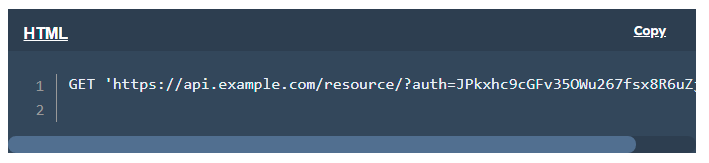
Or in a query string following the request method:
Are API keys secure?
Web APIs are a popular target for cyberattacks because they move sensitive data between applications over the internet, including login credentials, personal information, and financial transactions. That’s why web APIs have to be built to be extremely secure.
API keys can identify a project to an API and specify which resources that project may access. On their own, though, experts consider keys insufficiently secure, for a few reasons:
- A key can’t authenticate the individual user making the request, only the project or application sending it.
- Keys are like passwords: they only work if the owner stores them securely. In the wrong hands, a key is easily exploited.
- Keys rarely expire, so a hacker can use a stolen key indefinitely unless the owner regenerates or deactivates it.
For those reasons, popular APIs today lean on user authentication and authorization. Authentication confirms that the person making the request (rather than the application) is who they claim to be. Authorization confirms that this person is cleared to complete the request.
Both rely on authentication tokens, which are more secure than API keys. The OAuth protocol is today’s standard, letting users authenticate without handing over a password. It’s the same technology behind single sign-on, which lets you log into one application (like LinkedIn) through another (like Google).
OAuth is a more involved process that deserves its own article, so here’s an explanation of how OAuth works.
How to Store API Keys Securely
Despite their drawbacks, API keys remain popular and valuable for identifying calling projects. Odds are you’ll need to keep track of one or several when working with an API.
Keys work a lot like passwords and should be stored and protected the same way. A few basic steps limit the risk of a stolen key:
- Don’t write your key down somewhere public, like a sticky note or a file on a shared computer. You can safely access it inside your developer account.
- Be careful not to expose your key by accident when documenting your project, whether in screenshots, a public repository, or a URL.
- Don’t hard-code your key into your program, since anyone with access to your source files can then see it.
- Before sharing a key, regenerate it and label it as the newest shared key.
- Don’t share API keys over email.
- Always use HTTPS/SSL for your API requests. Some APIs won’t field a request without it.
- Assign a unique key to each project and label them clearly. If one is compromised, you can regenerate or deactivate it without touching your other projects.
API Key Examples
Here are a few popular APIs and how they use keys for security, to bring the point home.
Google Maps API Key
The Google Maps Platform secures map-data requests with API keys. Once you’ve created a Google developer account, you can generate a Google Maps key in your credentials area.
Google also encourages you to restrict your keys to approved domains, which you set in the credentials section, and the Google Maps API only accepts HTTPS-secured requests.
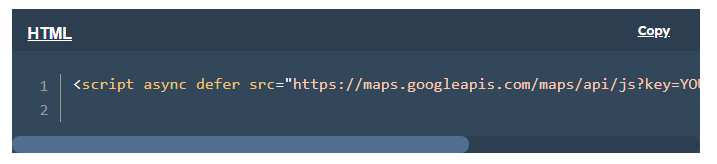
Google offers this example of a key in a request:
Want interactive Google maps on your website or app? Check out our beginner’s guide to Google Maps APIs.
What We Like
Thanks to their simplicity, Google’s API and keys are a great place to start if you’re new to APIs.
API Key for Stripe
Stripe, a payment processing service, issues API keys for each developer account to authenticate requests to its API. It generates two types: a “publishable” public key that connects your account to Stripe, and a “secret” private key that lets you make any request to Stripe.
Ideal for Testing
Stripe generates two sets of publishable and secret keys, one for your live application and one for testing, which brings your total to four. Test keys include the substring _test_.

Stripe also lets you generate keys with tighter restrictions when the API runs as a microservice.
When Should You Use an API Key?
API keys give you more control over how your software gets used, but knowing when to reach for one isn’t always obvious. Use the list below to decide whether a key fits your project:
- Block anonymous traffic: anonymous requests can point to malicious activity, and keys let you identify application traffic while helping with debugging and usage analysis.
- Control API calls: capping calls keeps consumption and traffic in check so only legitimate requests reach the API.
- Identify API traffic: reading usage patterns helps you catch malicious activity and problems inside the API.
- Filter logs: you can log and filter API server activity by key.
Keys also come with real limits worth remembering:
- They shouldn’t handle secure authorization, since they’re less secure than authentication tokens.
- They identify the project making the call, not the person who created or owns it.
- They identify projects, not the individual users who access them.
API keys can help secure your requests
API keys aren’t the only (or even the best) security measure available, but they’re useful for API vendors and required for authenticating API integrations.
As API integrations spread across new applications and smart devices, one thing stays constant: there will always be people looking to steal and exploit personal data. So any reputable API that transmits sensitive information will keep API keys, along with other safeguards, in its arsenal.